
Give the team a controlled workspace
Vault roles include Viewer, Author, Editor, Manager and Owner. Permissions distinguish viewing and downloading, uploading, editing, managing shares and changing ownership.
Keep project files together, organise folders and decide what each authorised person can do.
Vaults on all hosted plans. Desktop sending and sync require Professional or Business.
Vault roles include Viewer, Author, Editor, Manager and Owner. Permissions distinguish viewing and downloading, uploading, editing, managing shares and changing ownership.
Team Vault access is tied to authenticated users and their assigned roles. For an external person who does not have workspace access, send a protected message or File Drop request instead of assuming a public Vault link grants anonymous collaboration.
Document versions have their own identifiers and file hashes. Supported Vault provenance refers to the applicable version. A new revision is not automatically covered by the previous version’s proof. Enable and use the supported provenance workflow for the files concerned.
Professional and Business include authorised Vault sync to Windows and Mac folders. Organisation settings control devices, uploads, downloads and delete propagation. Local copies still need endpoint protection and cannot be treated as remotely erasable.
Create a Vault and organise its folders.
Assign authorised users the appropriate roles.
Upload and manage permitted files and supported versions.
Connect an authorised desktop client if the plan and policy allow it.
Follow the existing screenshot-led demonstration using sample content and test recipients.
See Vault sync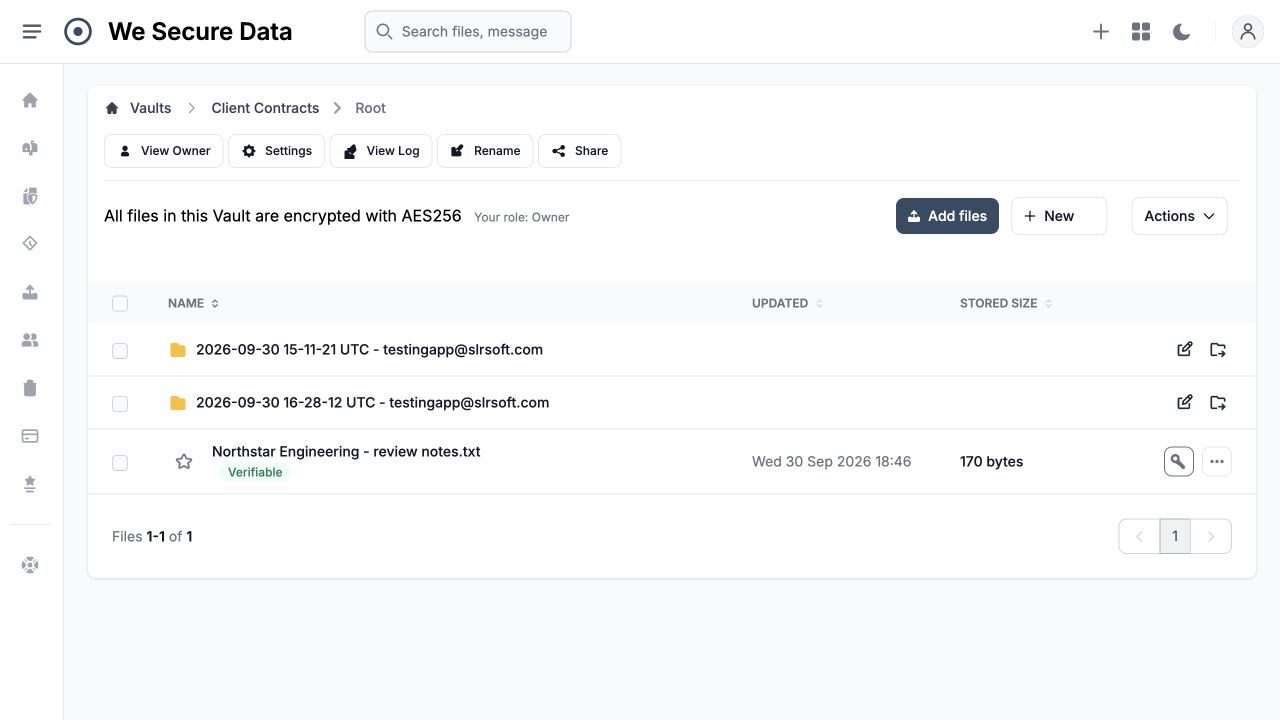 Open the full walkthrough →
No. The role and, for some actions, file ownership determine the available operations.
Do not assume that. Evidence depends on the file’s creation, version and provenance state. Check the applicable evidence before making an integrity claim.
This page does not promise general Word, spreadsheet or PDF co-editing. File versions and supported document operations are different from an unrestricted office editing suite.
Give clients a branded upload route for tax records, legal documents, financial statements and project files.
Explore the capability →Resolve questions about sensitive exchanges with time-stamped activity, rather than relying on inbox recollection.
Explore the capability →Manage users, roles, shared workspaces and communication settings around the way your organisation works.
Explore the capability →Explore the real product workflows or register your interest in the hosted platform.