Skip to content
DESKTOP INTEGRATION · WINDOWS EXPLORER & MACOS FINDER

Right-click. Send securely.
Keep the proof.

Turn the files on your desktop into a protected, verifiable exchange—directly from Windows Explorer or macOS Finder.

Select your documents where you already work. We Secure Data handles protected delivery and creates signed evidence of the content, so you can prove what you sent and recipients can check what they received.

Included with Professional and Business. Install from your signed-in account.

BUILT INTO YOUR EVERYDAY FILE WORKFLOW

Your files. Your desktop.
A secure exchange in a few familiar steps.

WINDOWS EXPLORER

Send straight from your PC’s file manager.

Select a file or group of files in Explorer and choose the We Secure Data action from the right-click menu. Choose the recipient and create your protected exchange without assembling ordinary email attachments.

Your recipient gets a secure link to the content. You retain the exchange and its evidence in We Secure Data.

See the Explorer workflow →
MACOS FINDER

Secure sending belongs in Finder.

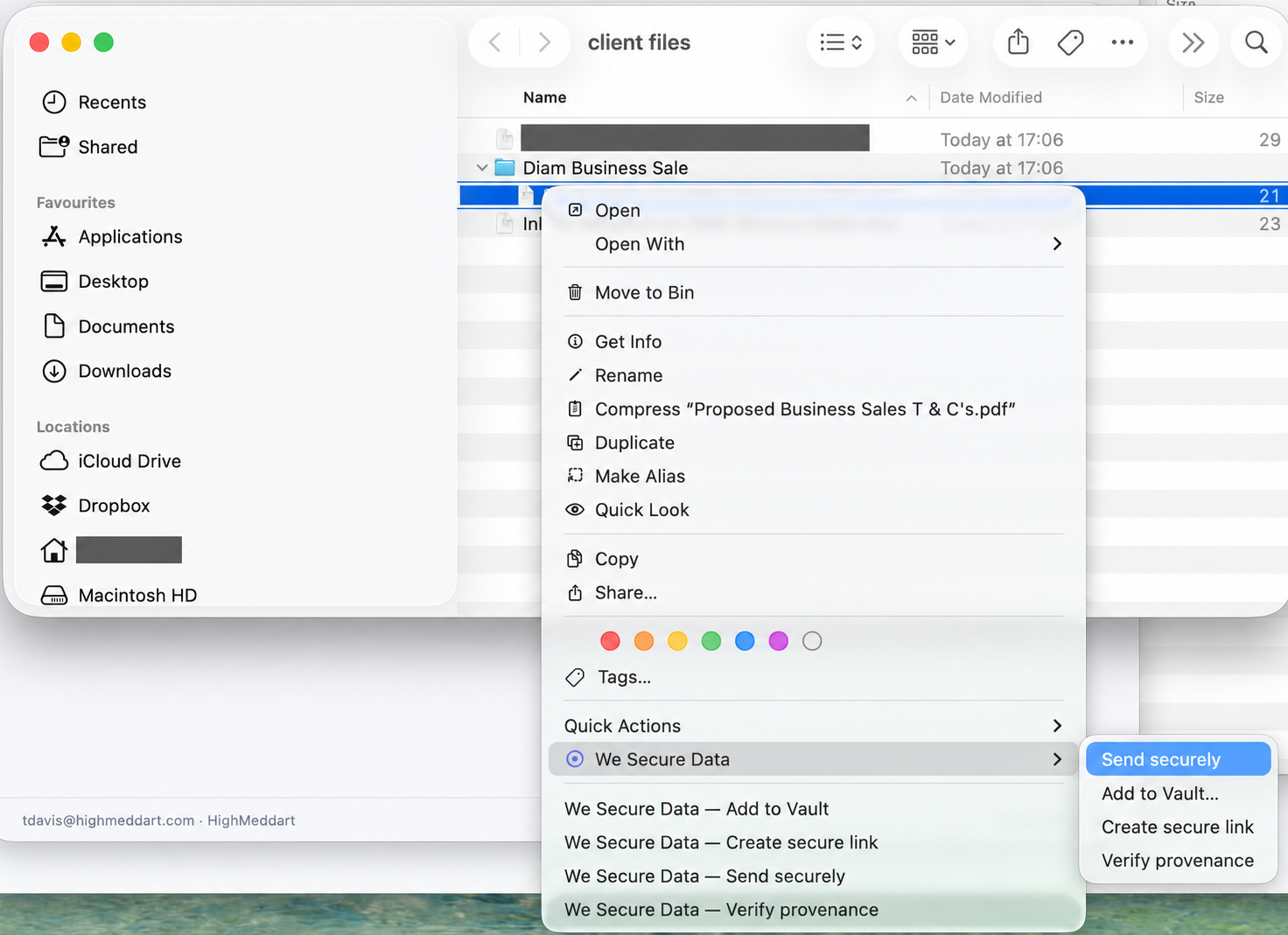
Use We Secure Data from Finder’s Quick Actions or Share menu. In synced folders, use the We Secure Data right-click action to send the files you are working on.

Select your documents, set up the protected exchange and send. The content and its signed evidence stay connected.

Follow a real Finder send →
REAL PRODUCT WORKFLOW

From a desktop file to evidence your recipient can verify.

Follow the actual journey: select a file in Finder, send securely, see the notification email, open the protected content and check its cryptographic evidence.

Explore the complete walkthrough
Actual Finder workflow used in the We Secure Data desktop sending demonstrationActual product capture · Explore the desktop send →
PROTECTION AND PROOF, BUILT IN

Give every important file a checkable record.

Protected content

Share through controlled access to the protected message and files, with the access checks configured for that exchange.

Proof of the exact version

Cryptographic fingerprints connect the evidence to the precise content sent. Recipients can compare what they receive with the signed record.

A familiar recipient experience

Your recipient follows a secure link from their notification email. You keep a record of the sent exchange in your workspace.

CONNECT THE REST OF YOUR WORK

Bring your Vaults to the desktop too.

We Secure Data Sync connects authorised Vaults to ordinary Windows and Mac folders. File Drop submissions routed into a synced Vault can arrive on your desktop automatically.

Explore Desktop Sync →

Keep using your email tools.

Work with the supported Outlook and Gmail integrations alongside desktop sending. Choose the route that fits the exchange; keep the same secure workspace and verifiable evidence.

Explore Gmail integration →
PROFESSIONAL & BUSINESS

Make secure sending a desktop habit.

Get the desktop application from your signed-in We Secure Data account.